Skip to content
AX SOLUTIONS & SYSTEMSAS-IS → AX.IS
WithADRM Studio

AX.IS

Designing agent-centric solutions that find company records and judge the next step

Agents independently search company records and evaluate tasks, leaving final approvals and decisions to people. ADRM first built this agent-centric architecture into its internal system, ADRM OS, and actively runs company operations with it.

  • 01Sales Records
  • 02Project Documents
  • 03Requests & Approvals
  • 04Policies & Manuals
State

AS-IS · Fragmented documents and recordsAX.IS · Connected operational knowledge

Connecting records scattered across departments and tools into a single, searchable body of operational knowledge.

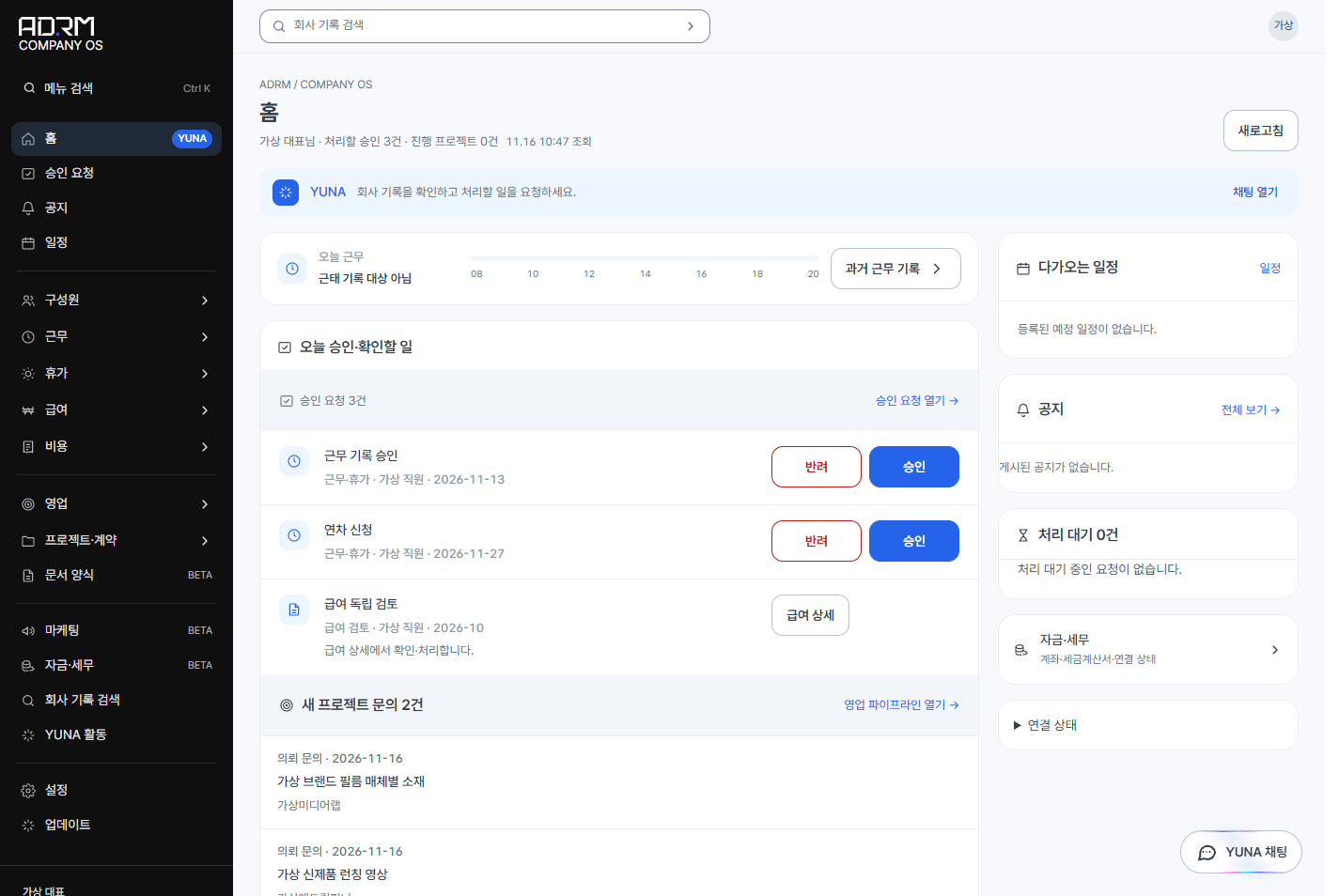
The home screen accessed by the virtual CEO displays pending approval requests, including a virtual employee's leave request with approve and reject buttons, alongside project inquiries and schedules.

Approval Requests on the Virtual CEO Home

Actual product screen · Demo data · 2026.11View Original ↗

SOLUTIONS

Three Core Operational Areas for Integration

We align records scattered across documents and chat apps with your actual workflow order, configuring role-based visibility and approval paths according to company operational standards.

01 · Sales

Sales Workflow Integration

Customer and sales records that remain continuous across team transitions

We consolidate and connect records generated throughout the sales lifecycle, including client details, consultation history, proposals, and contract terms. This reduces the effort of reconstructing context when account managers change or projects evolve, enabling teams to continue conversations on a single, shared record.

Human DecisionPricing adjustments, contract terms, settlements, and payment approvals are systematically designed around mandatory verification by designated managers.
02 · Operations

Operations Workflow Integration

Operational interfaces that connect project execution with review and approval paths

We centralize daily operational essentials, including active project statuses, member dashboards, company announcements, requests, and approvals. Systems are built with distinct visibility and permission levels tailored to individual contributors, team leads, and executives.

Human DecisionInternal requests for leave, expenses, and interdepartmental collaboration require review and final sign-off by designated decision-makers in accordance with company governance rules.

03 · Knowledge

Internal Knowledge and AI Integration

AI that connects documentation and operational context directly into daily work

We organize company policies, operating manuals, and project documentation into consistent structures accessible directly within daily work screens. We clearly separate areas where AI searches, summarizes, and drafts from areas where authoritative system records are finalized.

Human DecisionAI assists with document retrieval, summarization, draft preparation, and structured data organization, while external communications and critical record changes require human review and authorization.

INTERNAL CASE · ADRM OS

ADRM OS: An AI Work System Proven in Real Company Operations

ADRM OS is our proprietary internal operating system, developed in-house and used by ADRM to manage work hours, leave, expenses, payroll, sales, and treasury. It connects our entire sales pipeline, from customer inquiries and client management to estimates, contracts, projects, and settlement, directly with internal operations such as employee portals, announcements, requests, and approvals.

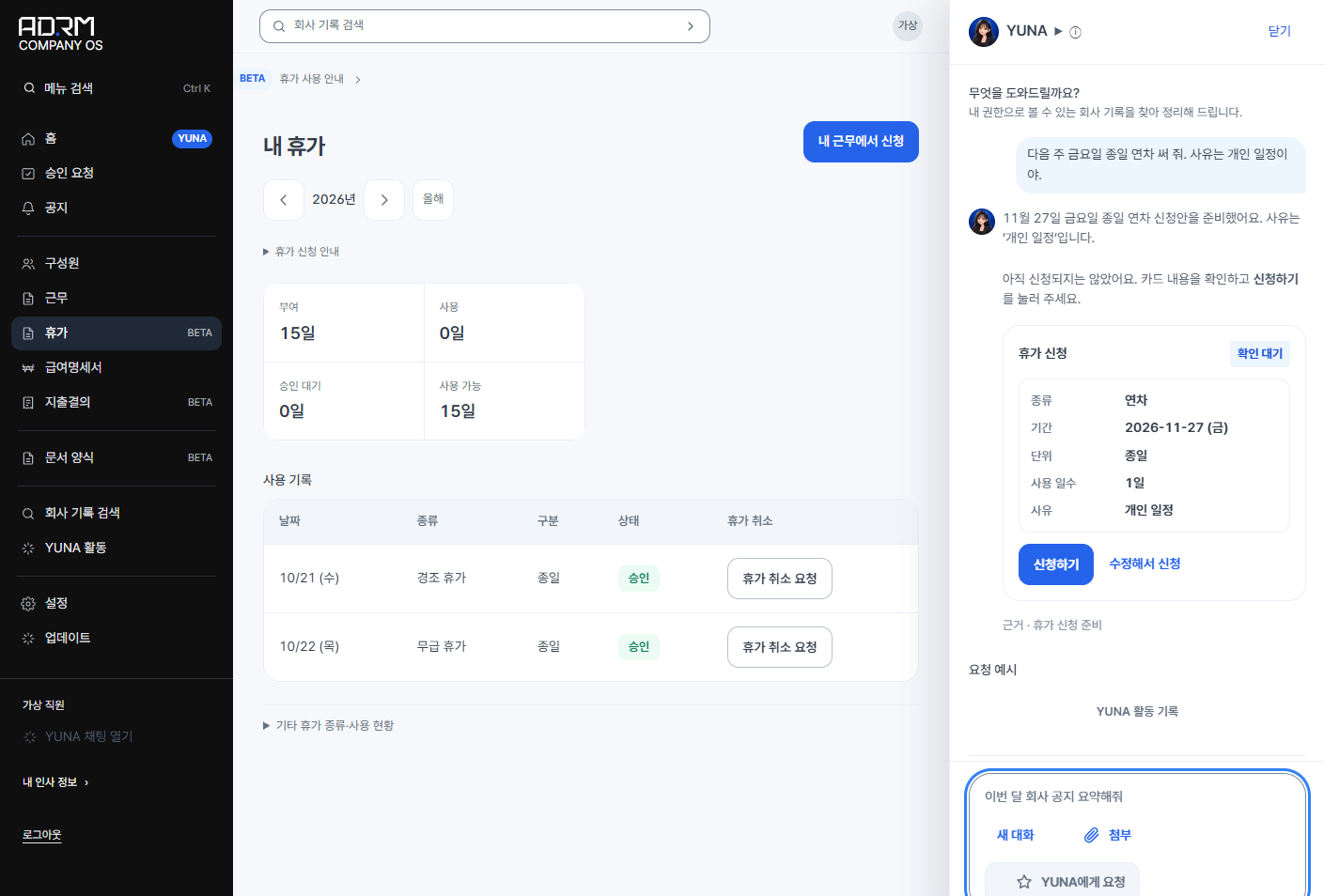
In the chat window beside the virtual employee's leave screen, the operational agent displays a prepared leave request card with a submit button.

Leave Request Card Prepared by the Operational Agent

Actual product screen · Demo data · 2026.11View Original ↗
  1. 01

    Sales and Project Integration View

    Implemented connected views spanning client inquiries, customer profiles, estimates, contracts, projects, and settlements, validating sales pipeline stages, linked customer histories, and quotation amounts using demonstration datasets.

  2. 02

    Team Portal and Approval Flow

    Developed team home dashboards, announcements, requests, and approval interfaces, verifying personal request tracking, list-to-detail navigation, review entry paths, and mobile responsiveness across simulated employee and executive roles.

  3. 03

    Record-Grounded Operational Agent

    When assigned a task in chat, the agent selects the required tools from approximately 50 operational tools, retrieves internal records, evaluates the context, and prepares structured draft cards. It cross-references company data to advance work directly to the human approval stage.

AGENT · ADRM OS

An Operational Agent That Retrieves Records, Verifies Details, and Prepares Work for Human Approval

The operational agent in ADRM OS autonomously queries and evaluates internal records based on operational context. It resolves dates, extracts receipt data, and identifies potential anomalies before compiling tasks into actionable cards for immediate human review. Clear control boundaries ensure that all final decisions and approvals remain strictly with authorized personnel.

Operational Workflow: From Record Retrieval to Final Approval

  1. 01

    Natural Language Request Intake

    When given instructions in natural conversational language, the agent resolves relative timing like "next Friday" into specific calendar dates. From attached receipt photos, it automatically extracts the transaction date, merchant name, amount, and business purpose.

  2. 02

    Internal Record Retrieval

    The agent selects appropriate tools from roughly 50 operational tools to query internal databases. Strict permission controls ensure it accesses only the specific records authorized for the logged-in user.

  3. 03

    Consistency and Anomaly Check

    The agent proactively flags discrepancies, such as receipt dates set in the future. If required details are missing, such as full-day versus half-day leave or the reason for a request, it prompts the user to complete the information.

  4. 04

    Action Card Preparation

    The agent organizes tasks into four standard action cards: work log entry, leave request, expense report draft, and notice posting. Each card explicitly cites the internal records and evidence used to generate it.

  5. 05

    Human Approval and Execution

    Prepared cards are committed to the system only after an authorized person reviews the details and clicks the action button. Total calculations and VAT computations are handled deterministically by the system, and every action is recorded in an audit log showing who did what and when.

Automated Background Operations

  • Hourly

    Collects new customer inquiries every hour and registers them directly into sales records.

  • On Approval Request

    When a new approval request is submitted, the system notifies the designated approver via Slack, enabling immediate approval or rejection directly within the messenger.

  • Every 15 Minutes

    Reconciles bank deposits via CLOBE integration against pending receivables. If the amount matches exactly, it marks the receivable as paid. If there is any discrepancy or ambiguity, it submits a verification card to the CEO for review.

Agent Autonomy and Governance Boundaries

Autonomous Agent Scope

The agent autonomously searches and cross-references internal records to answer inquiries or prepare operational cards. Access strictly mirrors individual permissions: employees access only their personal records, while the CEO can access company-wide data. It parses receipts, calculates dates, checks consistency, and organizes information into clear formats ready for human decision-making.

Human-Controlled Scope

Financial transfers, external document dispatch, tax invoice issuance, approval decisions, and permission or setting modifications are strictly blocked from autonomous execution. Even when the agent prepares the draft, execution requires explicit human review and sign-off. Financial totals and VAT calculations are handled directly by the system, with a complete audit log of who performed each action and when.

ADRM OS · Slack · Claude · ChatGPT (MCP)

Flexible Integration with Existing Tools

Beyond the ADRM OS chat interface, team members receive approval notifications and take action directly within Slack. With MCP (Model Context Protocol) connectors, users can also query internal company records from within Claude or ChatGPT. Regardless of the interface used, the user's defined internal access permissions apply consistently.

SELECTED WORK · BY WEBLAB

Internal Systems and Production Service Interfaces

Web applications and digital services delivered by the AX.IS team. Production credits follow the original designation (WEBLAB); confidential engagements list only project names and delivered scope.

Rankode website and service dashboard screens
Website · 2022–2024

Rankode

Design and logic architecture from website to service dashboard for a B2B conversational AI chatbot: UX analysis, wireframing, and UI design.

By WEBLAB
CL Mobility public transit service screens
Website · 2022

CL Mobility

Public transit MaaS platform and website: service policies, requirements definition, user scenarios, feature specifications, operating policies, and UI design.

By WEBLAB
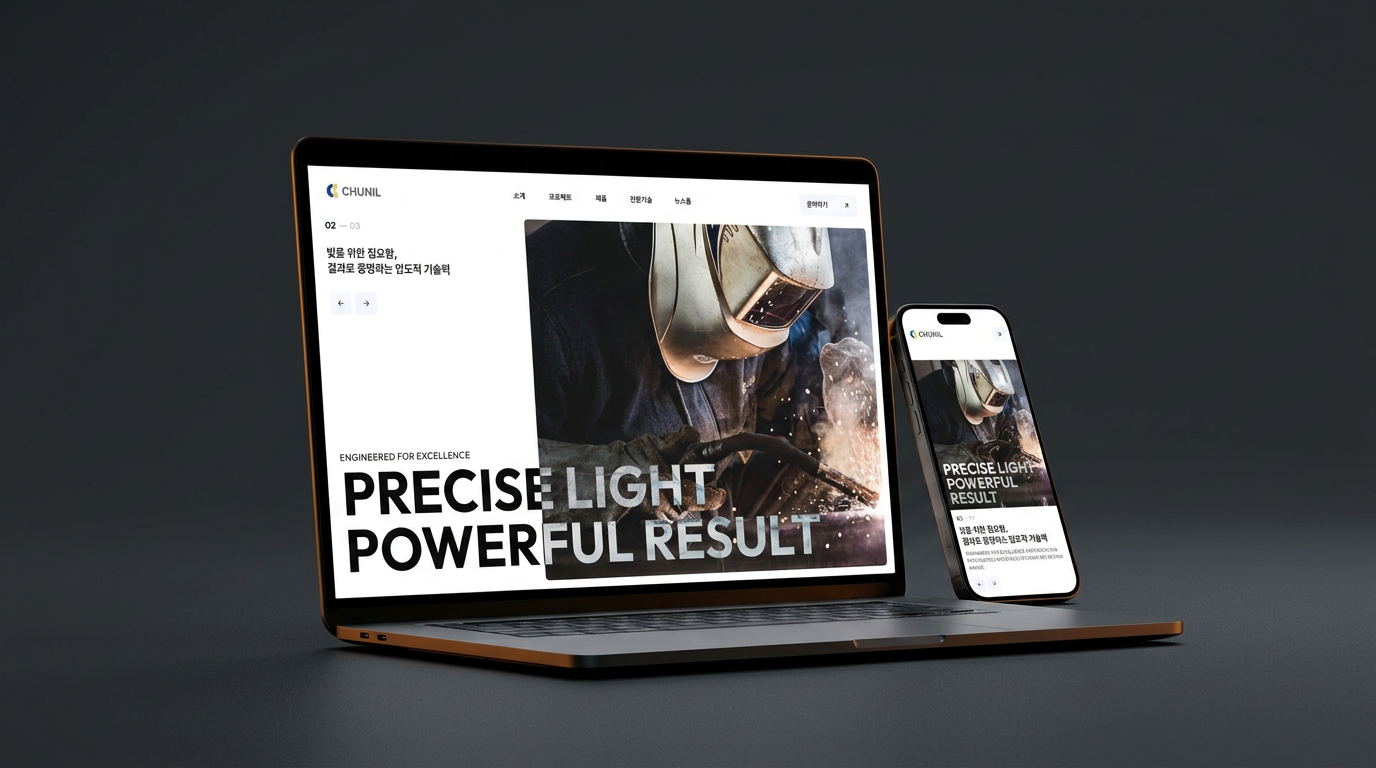
Chunil Lighting corporate website screens
Website · 2026

Chunil Lighting

Corporate website for a lighting manufacturer featuring product catalogs, certification statuses, and newsroom: built with Next.js, TypeScript, and Vercel.

By WEBLAB
  • 04

    HYBE Internal Portal

    Web app · 2025

    Development of HYBE internal portal

    Confidential Details / Produced by WEBLAB
  • 05

    Smile Hub

    Web app · 2024

    Development of Smilegate internal messenger Smile Hub

    Confidential Details / Produced by WEBLAB
  • 06

    KIST

    Web app · 2024

    Development of KIST internal note-taking application

    Confidential Details / Produced by WEBLAB

PROCESS

Starting with Targeted Integrations, Expanding Through Validation

Beginning with an assessment of current operations (AS-IS), we progressively build tailored target systems (TO-BE) step by step.

  1. Step 01

    Assessing Current Workflows and Tools

    We review repetitive manual tasks, points where information flow breaks down, and your current documentation and software environment.

  2. Step 02

    Defining Integration Scope and Access Control

    We identify an initial priority workflow to connect, defining required interfaces, data points, role permissions, and clear completion criteria.

  3. Step 03

    Interface Implementation and Workflow Validation

    After implementing the agreed scope, we walk through the process from initial task submission to record verification across practitioner and approver roles. We distinguish verified functionality from items requiring refinement before proceeding.

  4. Step 04

    Phased Deployment and Expansion

    We refine the environment based on validated workflows, then design the next phases, whether integrating additional operational areas or introducing AI-assisted capabilities.

COLLABORATION · AX.IS × ADRM STUDIO

From System Architecture to Value-Driven Demonstration Videos

System architecture and operational workflows are difficult to communicate through text alone. Through collaboration between AX.IS system engineering and ADRM Studio, an AI-Agentic Visual Studio, we provide both system implementation and visual communication.

AX.IS

We analyze enterprise sales, operations, and knowledge flows to design and build custom work systems reflecting role-based permissions and governance standards.

ADRM Studio

Delivering Engineered Imagery, ADRM Studio produces promotional and demonstration videos that articulate system interfaces, data architecture, and business value.

You can commission AX.IS system development and ADRM Studio video production together, or engage ADRM Studio independently to create promotional and demo videos for your existing solutions.

FAQ

Frequently Asked Questions

Key guidelines regarding service scope, integration with existing tools, human and AI role division, and video production collaboration.

01What does the name AX.IS stand for?

AX.IS represents AI transformation (AX), the central pivot of operational change (axis), and the transition from current practices (AS-IS) to the target state (TO-BE). It stands for establishing the core baseline that connects workflows and enterprise knowledge.

02Is this service limited to specific industries or video production companies?

No. Our services are designed for any enterprise seeking to streamline sales tracking, project operations, or internal documentation and knowledge management. We first analyze your team's workflow order and existing tools before building a custom solution.

03Do we need to replace all our existing software?

We first evaluate whether we can retain your existing tools by integrating only the necessary workflow gaps. The integration scope with third-party tools is determined after reviewing API availability, access permissions, and data structures.

04How does building an AI work system differ from deploying a standard AI chatbot?

Unlike standalone chatbots that only answer questions, AX.IS designs connected operational interfaces, role-specific data access, and review-and-approval workflows. AI capabilities for document search and draft preparation are integrated directly into this operational flow.

05Can we request a consultation if our documentation or operational standards are not yet fully organized?

Yes. Your documentation does not need to be fully standardized in advance. If you share frequent routine tasks, recurring bottlenecks in retrieving past records, and your current file formats, we will work with you to define the initial project scope.

06How are roles divided between AI and human staff within the system?

We apply the design principle: humans handle taste, judgment, and approval; AI handles search, execution, and memory. AI is designed to assist with document search, summarization, drafting, and rule-based record organization, while critical decisions involving accountability, such as pricing, contracts, and approvals, remain strictly with human managers.

07How are project timelines and development costs estimated?

Estimates are based on the number of workflow steps, external tool integrations, data structuring requirements, role permissions, approval hierarchies, and the scope of screens to develop and validate. During consultations, we present phased estimates starting with your highest-priority requirements.

08Are there existing implementation case studies available to review?

We share the case study of ADRM OS, our proprietary operating system designed and built to integrate sales workflows with internal company operations. The case study page, available in Korean, shows the screens we built and the scope we verified with demo data.

09Can we commission promotional and demonstration videos alongside system development?

Yes. AX.IS handles system architecture and development, while ADRM Studio produces promotional and demonstration videos illustrating system mechanics and business value. You can commission both together or request demo videos for existing systems independently.

10What should we prepare before our first consultation?

Simply identify one priority workflow you want to connect, your current tools, and the roles responsible for execution and approval. Describing your actual operational sequence, such as copying inquiry notes from chat into estimate spreadsheets, is enough. Detailed feature lists and specifications can be defined together during the consultation.

11What criteria are used to verify project completion?

We establish the workflow scope and operational test criteria prior to kickoff. We verify that designated roles access relevant data, preceding records carry over into the next views, and defined approval paths function as specified. Any additional features or future operational extensions are discussed separately following this validation.

INQUIRY

Start with the Scope You Need

Choose AX Solutions to build an enterprise work system, or Demo Videos to present your existing technologies and services. You can also inquire for both together.